


# Integrate Devtool to iOS
WARNING
iOS Devtools for Apache Weex is a third party plugin, and is not developed nor maintained by Apache Weex.
iOS Devtools for Apache Weex is a custom devtools for weex that implements Chrome Debugging Protocol inspired by Stetho, it is designed to help you quickly inspect your app and debug your JS bundle source in a Chrome web page. To make it work, at first you must integrate devtool to your App. This page will help you integrate devtool to your iOS App.
- Integrate Devtool to iOS
- Integrate Devtool to iOS
# Version compatibility
| WeexSDK | WXDevtool |
|---|---|
| 0.16.0+ | 0.15.3 |
| 0.17.0+ | 0.16.0 |
| 0.18.0+ | 0.16.3+ |
| 0.19.0+ | 0.17.2+ |
| 0.20.0+ | 0.20.0+ |
| 0.24.0+ | 0.24.0 |
# Integrate to iOS
# Installing Dependencies
There are two choices to install dependencies:
# From cocoapods
source https://github.com/CocoaPods/Specs.git
pod  'WXDevtool', '0.24.0', :configurations => ['Debug']
I strongly recommend you use the latest version since both Weex SDK and devtools are developed iteratively and rapidly.
# From source code
git clone git@github.com:weexteam/weex-devtool-iOS.git- Copy source folder to your project.
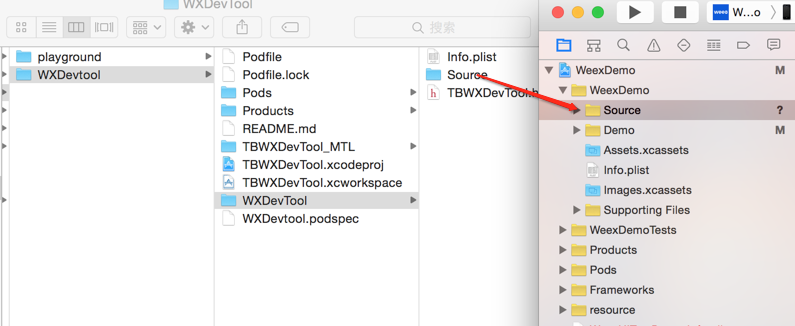
- Choose options as the picture shows.

# Integrate
You can see the demo here Playground App.
# Step 1. Add header file in AppDelegate.m
//1. From cocoapods
#import <WXDevtool/WXDevtool.h>

//2. From source code
#import "WXDevtool.h"
# Step 2. Initialize inspector when the APP launched
You can see the WXDevtool header file as follows:
+ (void)setDebug:(BOOL)isDebug;

+ (BOOL)isDebug;

+ (void)launchDevToolDebugWithUrl:(NSString *)url;

@end
**Note: The inspector API must be called before weex is initialized **
if your application is a pure weex project, you need to ensure that the initial value of setDebug is NO, otherwise it may be white screen on the first page of the weex page
setDebugsetDebugis used to control the state of debug mode, when its value isYES, open the debug mode, otherwise closed.(void)launchDevToolDebugWithUrl:(NSString *)url;
You can fix the link address by command weex debug --port 8888 --channelid 1, and connect debug server like below:
eg:
- (BOOL)application:(UIApplication *)application didFinishLaunchingWithOptions:(NSDictionary *)launchOptions {

  [WXDevTool setDebug:NO];
  [WXDevTool launchDevToolDebugWithUrl:@"ws://{ip}:{port}/debugProxy/native/{channelid}"];
 }
# Step 3. Auto refresh
Q: Why do we need auto refresh feature?
A: As shown in future, when you click the JSDebug button, Javascript runtime environment will change from the phone (JavaScriptCore) to PC (Chrome V8), then Weex need to re-initialize the Weex environment, re-render the page. Page rendering is required for the developer to add on its own page.
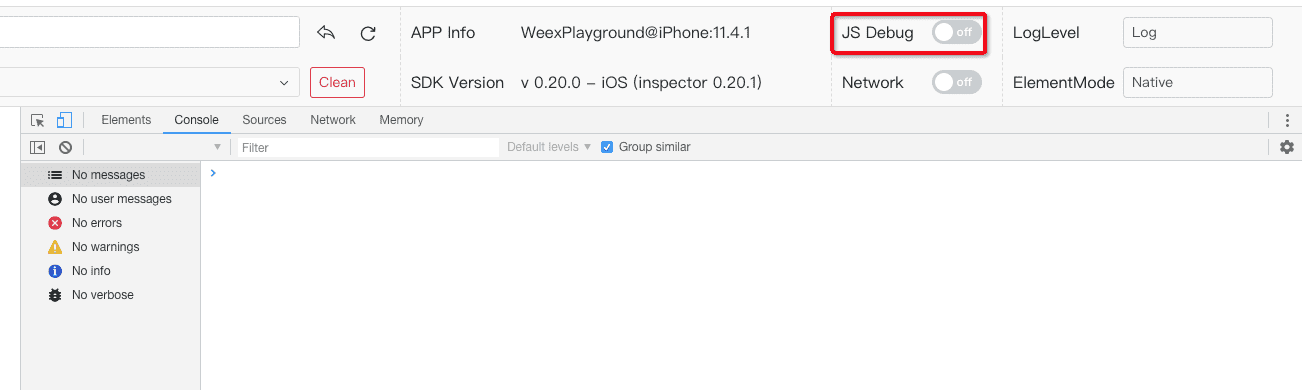
Q: What kind of scene need to add refresh feature?
- Click debugger button
- Switch remoteDebug
- Refresh inspect page
Q: How to add auto refresh feature?
Register events when Weex initialization.
[[NSNotificationCenter defaultCenter] addObserver:self selector:notificationRefreshInstance: name:@"RefreshInstance" object:nil];
Notes: You must cancel this event in the dealloc method. For example:
- (void)dealloc
{
    [[NSNotificationCenter defaultCenter] removeObserver:self];
}
For example, First you can destroy the current instance, and then re-create instance:
- (void)dealloc
{
    [[NSNotificationCenter defaultCenter] removeObserver:self];
}
destroy instance,and reCreate new instance,example:
  - (void)render
  {
    CGFloat width = self.view.frame.size.width;
    [_instance destroyInstance];
    _instance = [[WXSDKInstance alloc] init];
    _instance.viewController = self;
    _instance.frame = CGRectMake(self.view.frame.size.width-width, 0, width, _weexHeight);

    __weak typeof(self) weakSelf = self;
    _instance.onCreate = ^(UIView *view) {
        [weakSelf.weexView removeFromSuperview];
        weakSelf.weexView = view;
        [weakSelf.view addSubview:weakSelf.weexView];
        UIAccessibilityPostNotification(UIAccessibilityScreenChangedNotification,  weakSelf.weexView);
    };
    _instance.onFailed = ^(NSError *error) {

    };

    _instance.renderFinish = ^(UIView *view) {
        [weakSelf updateInstanceState:WeexInstanceAppear];
    };

    _instance.updateFinish = ^(UIView *view) {
    };
    if (!self.url) {
        return;
    }
    NSURL *URL = [self testURL: [self.url absoluteString]];
    NSString *randomURL = [NSString stringWithFormat:@"%@?random=%d",URL.absoluteString,arc4random()];
    [_instance renderWithURL:[NSURL URLWithString:randomURL] options:@{@"bundleUrl":URL.absoluteString} data:nil];
}
You can see the details in this case WXDemoViewController.m
 Excellent doc